
Questions & answers
Our tagging schema
A guide to the information included in your Tango Time Travel music files, from performers and recording dates to original record references.
Ready for your music library
Our music files arrive tagged. The tags describe the recording and help you browse, sort and identify it in your music library. The metadata system depends on the audio format; your player or tag editor may use different names for the same information.
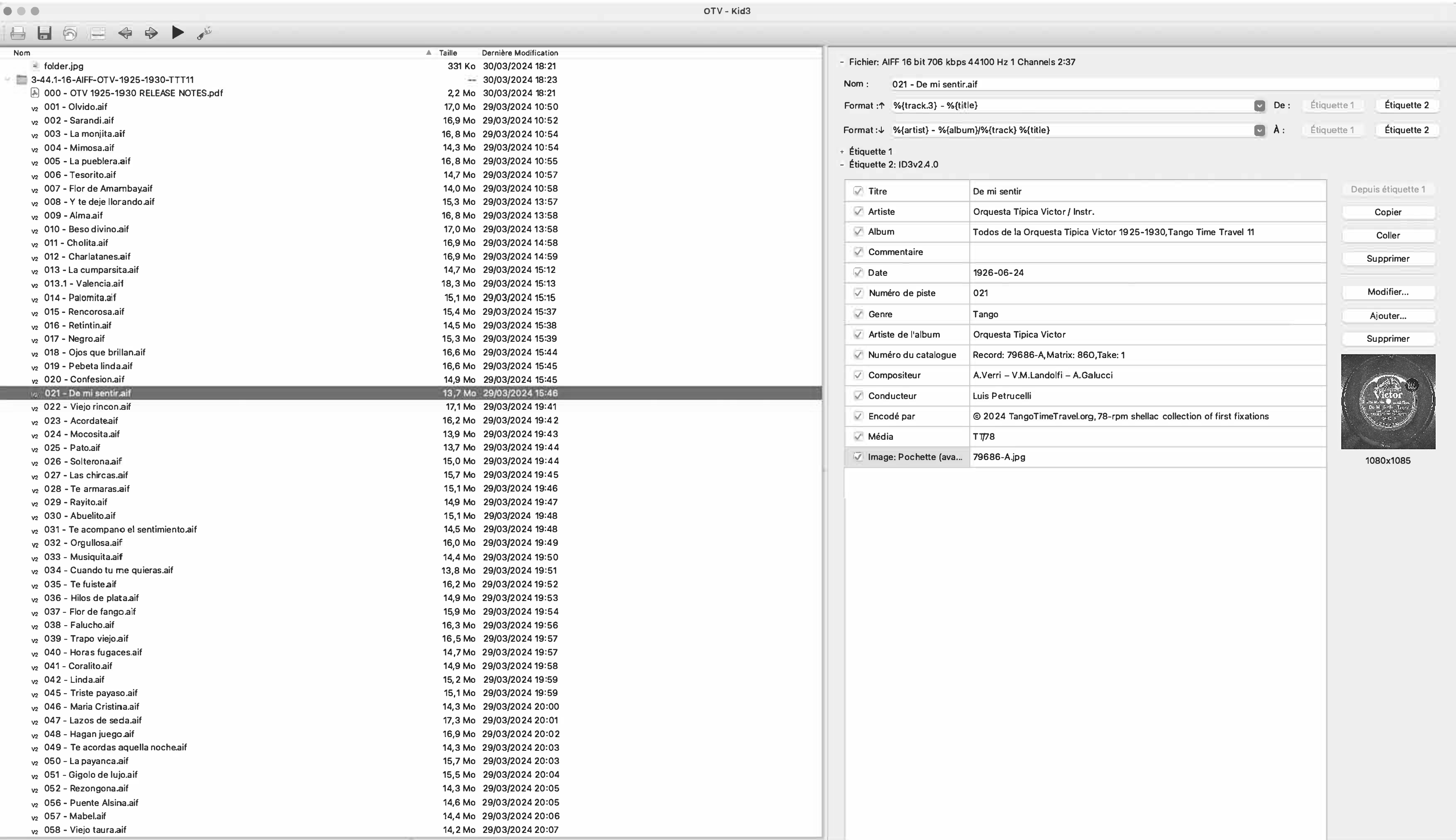
The PDF linked above shows a worked example in Kid3: De mi sentir, performed by Orquesta Típica Victor and recorded on 24 June 1926. It is an example of the schema, rather than a promise that every player will display every field in exactly the same way.
Who is playing?
Artist — orchestra and singer
We put the orchestra first, followed by the singer, separated by a space, a slash and another space: Orchestra / Singer. For an instrumental recording, the second part is Instr.
In the PDF: Orquesta Típica Victor / Instr. The singer information is kept in the Artist field rather than a separate custom field. Orchestra names use their natural written order, such as Juan D’Arienzo.
Album artist — the main artist
This field identifies the main artist of the album, usually the orchestra. In the example it is Orquesta Típica Victor. For a compilation with several performing artists or orchestras, it may be Various artists. Keeping this separate from the track’s Artist field helps group an album even when its singers change.
Composer and conductor
The Composer field brings together the composer and author credits. The example shows A. Verri – V. M. Landolfi – A. Gatucci. The Conductor field identifies Luis Petrucelli in this recording. Credit punctuation may differ between releases.
Finding the recording
Title, album and track number
Title is the name of the piece: De mi sentir. Album identifies the TTT collection: Todos de la Orquesta Típica Victor 1925–1930, Tango Time Travel 11. Track number gives its place in that collection: 021 in the example.
Date and genre
The example’s Date field is 1926-06-24, the recording date, written year–month–day. Its Genre is Tango. These fields help distinguish recordings and musical forms within your library.
Catalogue number — record, matrix and take
We use this field for the original record references, presented together as a comma-separated list. The PDF shows Record: 79686-A, Matrix: 860, Take: 1.
- Record identifies the issued record and side.
- Matrix identifies the recording matrix.
- Take identifies the take of that recording.
These references let you connect the audio file with the discography and the original record label.
The source and its image
Media — the original playback medium
This field describes the source medium used for the transfer, not the format of the downloaded file. TT/78 denotes a turntable record played at approximately 78 rpm; TT/33 denotes a standard LP. The example uses TT/78.
Embedded artwork
The PDF shows the original record-label photograph, 79686-A.jpg, embedded as front-cover artwork. This provides a visual reference alongside the catalogue number, matrix and take information.
Encoded by and Comment
The example’s Encoded by field identifies Tango Time Travel and the transfer collection. The Comment field is empty in this example; an empty field does not indicate that tagging is missing.
Reading the tags in your player
A player’s usual library view may show only the title, artist and album. Its information panel, or a tag editor, can expose the additional fields. The reference PDF uses French interface labels: Artiste is Artist, Artiste de l’album is Album artist, Numéro du catalogue is Catalogue number and Média is Media.
Download the original tagging schema PDF to compare the fields with the worked example.